Client generation
Before starting this section, you will need to have a solution to Practical 2. You can use your own, or you can start from the model solution of Practical 2.
Obtaining the OpenAPI specification
We want to integrate an external service to have better information about our books. For this practical, we have chosen the OpenLibrary API, as they have an OpenAPI sandbox that we can experiment with.
As a first step, visit their sandbox (see link above), and download the openapi.json file linked from under the “Open Library API” header (the link in “Contribute by proposing edits to openapi.json”).
Move and rename the openapi.json file to src/main/openapi/openlibrary-0.1.0.json in your project.
Adding the Micronaut OpenAPI Gradle plugin
If we want to generate clients from the OpenLibrary OpenAPI spec, we will need to add the Micronaut OpenAPI Gradle plugin to our build.gradle.
Open your build.gradle file, and add this line to the plugins section:
id("io.micronaut.openapi") version "4.6.1"
Configuring the Micronaut OpenAPI Gradle plugin
We also need to let the Micronaut OpenAPI Gradle know about the OpenLibrary spec.
Within the micronaut section of the build.gradle file, add this block:
openapi {
  client("openlibrary", file("src/main/openapi/openlibrary-0.1.0.json")) {
    apiPackageName = "uk.ac.york.cs.eng2.books.openlibrary.api"
    modelPackageName = "uk.ac.york.cs.eng2.books.openlibrary.model"
    clientId = "openlibrary"
    useReactive = false
  }
}
Save the file and reload all Gradle projects as we did at the end of the first section of Practical 2.
If you did it correctly, the “Gradle” drawer in IntelliJ should show a new “Tasks - micronaut openapi” folder.
Try running the build Gradle task.
You will see that a number of classes ending in Api were generated for us within the build/generated/openapi folder:
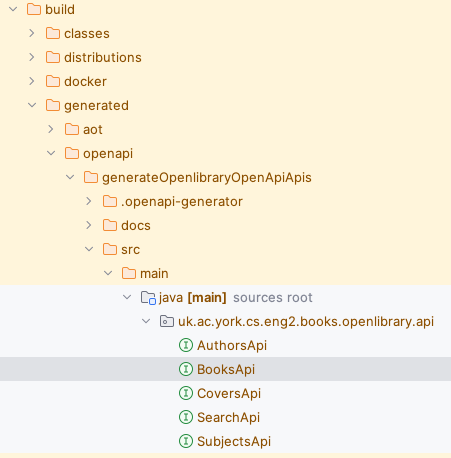
Specifying the base URL of the OpenLibrary API
You may notice that we specified a clientId in the openapi block.
This allows us to configure the generated client from the application.properties files.
Specifically, we’ll need to tell Micronaut how to access the OpenLibrary API.
Edit the src/main/resources/application.properties file, and add these lines:
micronaut.http.services.openlibrary.url=https://openlibrary.org/api
Examining the generated code
Have a look through the generated code. You may notice one oddity - the return types are all plain Objects, like this one from BooksApi:
/**
 * {@summary Read Isbn}
 *
 * @param isbn (required)
 * @return Successful Response (status code 200)
 *         or Validation Error (status code 422)
 */
@Get("/isbn/{isbn}")
Object readIsbnIsbnIsbnGet(
    @PathVariable("isbn") @NotNull Object isbn
);
Unfortunately, it seems that at the moment the OpenAPI specification is manually written, and that they do not use schemas. We will have to write additional logic in our gateway that understands the format of the response.