Adding libraries
Before starting this section, you will need to have a solution to Practical 1. You can use your own, or you can start from the model solution of Practical 1.
What we need
We need to add a few things to our project from Practical 1:
- A JDBC driver: in this course we will connect to MariaDB databases.
- A connection pooling library: we will use HikariCP.
- A database migration framework: we will use Flyway.
- A database access toolkit: we will use Micronaut Data JPA.
- Micronaut Data JPA internally uses the Hibernate ORM.
Micronaut projects typically follow a modular structure, where you can add a number of features to it with support for various technologies. You already did this in Practical 1, by picking the features for OpenAPI generation and the Swagger UI. We will do the same here, but instead of creating a new project, we will be extending our existing project.
Updating our project
The easiest way to find out the changes we have to make in our project is to use Micronaut Launch.
Instead of generating a new project, we will instead produce a diff which will indicate the changes that we should make.
Open Micronaut Launch. Ensure the settings match those you used in Practical 1 (Java Version, Name, Base Package, Build Tool, and so on). Click on “Features” and select these elements:
mariadb: the JDBC driver for MariaDB.jdbc-hikari: the connection pooling library.flyway: the database migration framework.data-jpa: the Micronaut Data library in its JPA flavour.
Click on “Diff”, and it will produce a patch in the unidiff format with the changes that would have to be made, like this one:
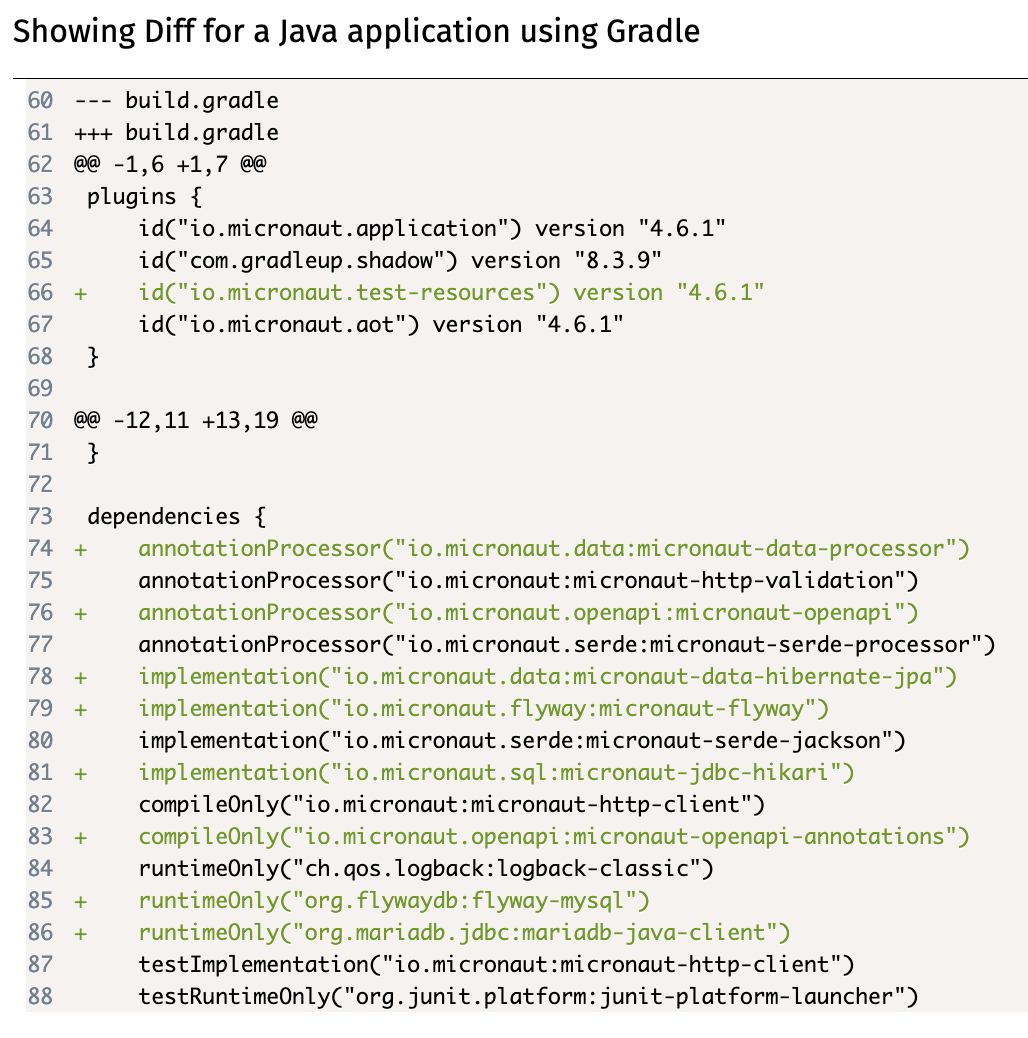
Unfortunately, this patch will often not be directly usable via automated tools (as we will have made customisations from the initially generated project), so we will have to make its changes manually. Here is a quick summary of the notation:
--- OLD_FILEand+++ NEW_FILErefer to the old and new locations of a file.OLD_FILEandNEW_FILEmay be the same if the file has not been moved.@@ -oldL, oldS +newL, newS@@start ahunkdescribing a change in the file. The hunk refers to the lines fromoldLtooldL+oldSin the old file, and to the lines fromnewLtonewL+newSin the new file.- Lines starting with
-are the old lines to be removed, compared to a default Micronaut configuration. - Lines starting with
+are the new lines to be added, compared to a default Micronaut configuration. - Lines starting with a space are just context to help understand the change.
If you read through the changes, you will see that you have to do the following:
- Optionally, add a few
featuresto the list inmicronaut-cli.yml, which match the ones you selected in Micronaut Launch. This is only used by Micronaut CLI, which is not used in the module: you may skip this. - Add the
io.micronaut.test-resourcesplugin to the list in yourbuild.gradlefile. - Add any dependencies you don’t have already to the
dependenciesblock in yourbuild.gradlefile. - Optionally, add some text to your
README.mdfile with some useful links to the relevant documentation. - Create a new
src/test/resources/application-test.propertiesfile with some content within your project. - Add a few lines to your
src/main/resources/application.propertiesfile.
When copying and pasting the new lines, remember to remove the initial + as that is just for indicating that it’s new text.
What do these changes mean?
The changes in the micronaut-cli.yml file are for integration with the Micronaut CLI, which we do not use in this module: you can skip them.
The changes in the build.gradle file make some important additions:
- They add the Micronaut Test Resources plugin to our Gradle build, which will use our local installation of Docker Desktop to automatically start anything we need for local development and testing (namely, MariaDB and later Kafka).
- They add the various Java libraries required to use Micronaut Data JPA with a MariaDB database.
As said above, the README.md changes are just some useful links that you can check while doing this practical.
The application-test.properties changes tell Hibernate that it should not try to automatically create tables in our database from our JPA-annotated classes, by setting the hbm2ddl.auto option to none. (hbm refers to Hibernate, and ddl refers to SQL Data Definition Language queries like CREATE TABLE.)
The application.properties changes do a few things:
- They indicate that the
defaultdata source is a MariaDB database, using theMYSQLdialect of SQL (used for the underlying JDBC connection), and specifying the fully-qualified class name of the MariaDB JDBC driver. - They turn on Micronaut Flyway for the
defaultdata source, so it will automatically apply all pending database migrations on startup. - Since we’re using Flyway, they also disable
hbm2ddlhere.
Ready to move on?
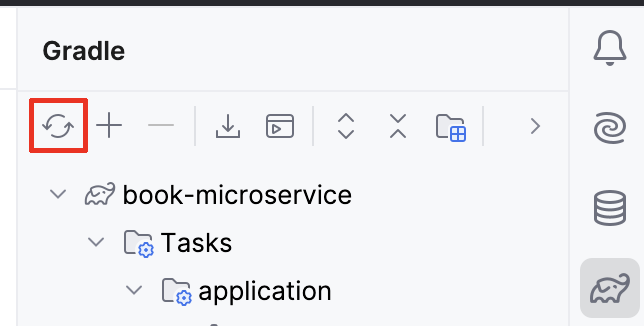
Once you’ve made all the changes in the patch produced by Micronaut Launch, ensure that your IDE reloads the Gradle project.
In IntelliJ, this can be done by pressing the “Reload All Gradle Projects” in the Gradle drawer:
Do not try to run the project yet, as we still have some changes to make.