Model-to-text transformation
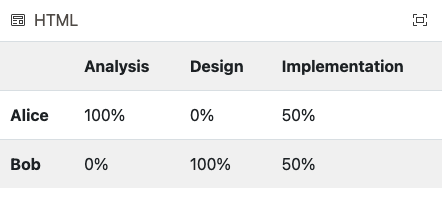
As a warm-up exercise, modify this M2T transformation in Epsilon’s online playground so that it generates a table with task names as column headers and person names as row headers, as shown below.
Problem
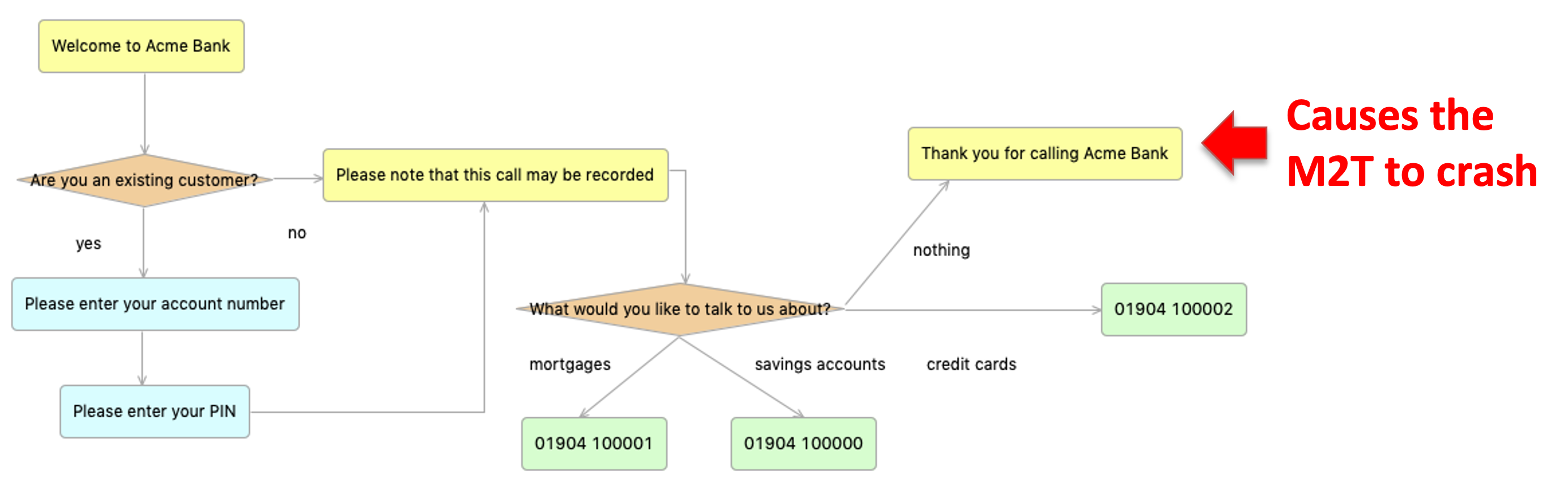
While the callcentre2java model-to-text transformation discussed in the M2T lecture works fine for models that end with call redirections, it crashes for models that end with statements.
Preparation
- Clone this Github repository
- Alternatively, download a copy of its contents
- Run the Epsilon Eclipse distribution
- Import only the following projects from the repository/zip file
ac.uk.york.callcentreac.uk.york.callcentre.editac.uk.york.callcentre.editorac.uk.york.callcentre.validationac.uk.york.callcentre.design
- Make sure that all imported projects are under the
H:orC:drives - You can double-check their location by right-clicking on them in Eclipse and selecting the
Propertiesmenu item - Run a nested Eclipse instance by right-clicking on one of the projects above within Eclipse and selecting
Run as -> Eclipse Application - In the nested Eclipse instance import only the following projects from the repository/zip file
ac.uk.york.callcentre.m2tacmebank.modelacmebank.application
- Run the
callcentre2java.egxEGX M2T transformation against theacmebank.callcentremodel so that it generates code under thesrc-genfolder of theacmebank.applicationproject- Create a new
EGL Generatorrun configuration (like you did for EOL and EVL in previous practicals) - Set its source to
callcentre2java.egx - Set the
Files should be generated indirectory to theacmebank.applicationproject
- Create a new
- Run the generated
AcmeBank.javaclass- Optional: implement the validation logic for PINs as shown in the M2T lecture
Fix the M2T transformation
- Add a
Thank you for calling Acme Bankstatement to your model, and a transition to it as shown in the problem description- Don’t forget to give the new statement a name in the
Propertiesview!
- Don’t forget to give the new statement a name in the
- Re-run the M2T transformation and notice how it crashes with a runtime exception (
Called feature 'to' on undefined object) - Exercise #1: Modify the source code of the M2T transformation to fix the problem
Extend the M2T transformation
- In the current version of the generated code, a user needs to enter the number of the transition they wish to take at decision points
- e.g.
1 for yes, 2 for noinAre you an existing customer?
- e.g.
- Exercise #2: Modify the M2T transformation so that the code produced accepts both the number and the text of the transition
- e.g.
1 or "yes" for yes, 2 or "no" for noinAre you an existing customer?
- e.g.
HTML generation
- So far, you have been modifying the existing callcentre2java.egx M2T transformation
- Exercise #3: write a new M2T transformation that transforms a call centre model into a set of HTML pages
- One HTML page for each step
- Hyperlinks in the generated pages to represent transitions

Solutions
Model solutions for the exercises are available in this ZIP file.