Model-to-model transformation
Exercise 1: Study this ETL transformation, which demonstrates generating multiple output elements from a single source element. Modify this ETL transformation on Epsilon’s Playground so that it generates 2 deliverables per task:
- One interim report halfway through the task
- One final report at the end of the task
Exercise 2: Study this Flock migration transformation on Epsilon’s Playground. Now complete this Flock migration to add effort elements to the migrated model.
Note
The names of the original and migrated models in the Flock transformation of Exercise 2 are
OriginalandMigratedrespectively. Therefore, to create a newEffortelement in the migrated model you can usevar effort : new Migrated!Effort;.
Note
You can develop the transformations above either directly on the Playground or in Eclipse, as demonstrated in the respective lectures. If you develop them on the Playground, we advise you to also download copies (using the Playground’s
Download -> Ant (Eclipse)menu and dialog) and run them within Eclipse.
Exercise 3
Write a M2M transformation with ETL that produces a MiniVoiceXML model from a call centre model. MiniVoiceXML is a toy version of the W3C VoiceXML specification.
MiniVoiceXML metamodel
- A
Documenthas 0+Dialogs, which can beFormsorMenus: execution starts from firstDialog - A
Formhas 0+FormItems:Formgets inputs from the caller and assigns them to variablesField: prompt the caller, read line of input, and assign input to var with givennameTransfer: transfer the caller to another number (destusestel:NUMBER)Block: 0+ executable elementsGoTo: switch to another DialogPrompt: output text to user
- A
Menuhas aPromptand 1+Choice: runs thePromptthen shows options and waits for choicedtmf: number (1-9) to be typed by callernext: Dialog to traverse to if chosen
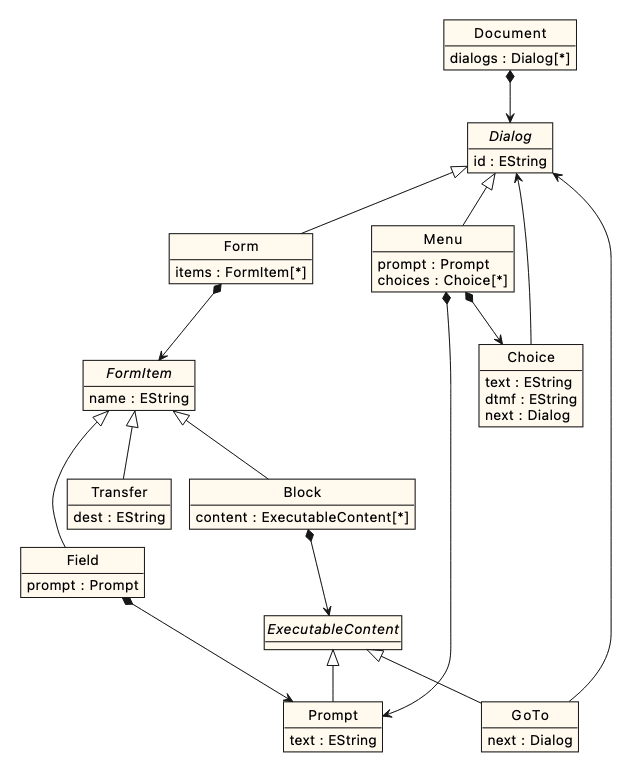
The transformation
- Clone this Github
- Alternatively, download a copy of its contents
- Import the metamodel project (
minivoicexml) into Eclipse - In a nested Eclipse, import the interpreter (
minivoicexml.interpreter) project - In the nested Eclipse, create a new project named
callcentre2minivoicexml - In the new project, create an ETL script with these rules:
Model→Documentwith theDialogsproduced from theSteps- The first
Dialogshould be the one from the firstStepthat would be run
- The first
Statement→FormwithBlockcontaining aPromptCallRedirection→FormwithTransfer(watch out fordestformat)InputQuestion→FormwithFieldcontaining aPromptDecision→MenuwithPromptTransition→- If the source is a
Decision: addChoiceto theMenufrom the source node- Remember to set the
dtmf,text, andnextfeatures correctly!
- Remember to set the
- Any other: add
GoToto theBlockat the end of theFormfrom source node- If such a
Blockdoes not exist, add it as well - Remember to set the
nextreference to the equivalent of theTransitiontarget
- If such a
- If the source is a
- Run your ETL script on your sample model:
- Configure the launch so the new model is saved to
generated-voicexml.modelinside yourcallcentre2minivoicexmlproject
- Configure the launch so the new model is saved to
- Run the resulting MiniVoiceXML models on the interpreter:
- In
minivoicexml.interpreter, right-click onLauncher.launch, selectRun As –> Launcher - The interpreter will run from the
Consoleview: check that the model behaves as expected by entering your answers
- In
Solutions
- Exercise 1
rule Project2Project
	transform s : Source!Project
	to t : Target!Project {

	t.name = s.name;

	// Transform the tasks of the source
	// project using the Task2Deliverable
	// rule and assign the result to
	// t.deliverables
	t.deliverables ::= s.tasks;
}

// Transform each task to two deliverables
// to be submitted in the middle and at the end of the task
rule Task2Deliverable
	transform t : Source!Task
	to interim : Target!Deliverable,
       final : Target!Deliverable {

	interim.name = t.name + " Interim Report";
	interim.due = t.start + (t.duration / 2);

	final.name = t.name + " Final Report";
	final.due = t.start + t.duration;

	// The lead of the deliverables
	// is the person with the highest
	// effort in the task
	var lead = t.effort.sortBy(e|-e.percentage).
		first()?.person;

    interim.lead ::= lead;
    final.lead ::= lead;
}

// @lazy means that persons will be transformed
// only upon request. As such, Charlie will not
// appear in the target model because he leads
// no deliverables
@lazy
rule Person2Person
	transform s : Source!Person
	to t : Target!Person {

	t.name = s.name;
}
- Exercise 2: A reference solution is available on Epsilon’s playground.
- Exercise 3: A reference solution is available on Epsilon’s playground.